Some of the most successful creators on Facebook aren’t names you’d ever recognize. In fact, many of their pages don’t have a face or recognizable persona attached. Instead, they run pages dedicated to memes, animal videos and yes, AI-generated photos and videos.
The people behind these pages are experts at creating content that can catch Facebook’s algorithm and go viral. Successful pages can generate tens of thousands of dollars a month from performance bonuses, revenue-sharing and other monetization programs that pay Facebook creators for popular content.
For years, Meta fostered this industry of viral content on Facebook. As the company transformed Facebook’s main feed into a “discovery engine” of recommended posts from random pages and accounts, creators supplied a stream of content crafted for the algorithm. But over the last year, some creators say this dynamic has broken down. Meta has penalized creators for the very same content it once rewarded. Other creators have seen Facebook’s payment systems break down due to glitches and other errors.
One creator has become so frustrated, he’s filed dozens of lawsuits in small claims court against Meta over the last year. Some of those lawsuits are related to missing payments and account issues he’s experienced, but he’s also brought 23 cases related to other creators’ Facebook pages. As several of those cases are now winding their way through small claims court, he hopes his actions will bring attention to what he says is a wider breakdown in Meta’s relationship with Facebook creators.
The cases shine a light on how Meta’s lack of human-centered customer service can impact creators who rely on the platform. But it also offers a glimpse into the volatile dynamics of viral Facebook content.
Mel Bouzad is a former photojournalist for Getty Images who for the past eight years has made his living running popular Facebook pages with names like “The Meme Bros” and “FunkiestShitEver.” He posts memes, travel content and AI-generated videos. Over the years, he’s become an expert at figuring out what type of content is most likely to rack up views and comments on Facebook.
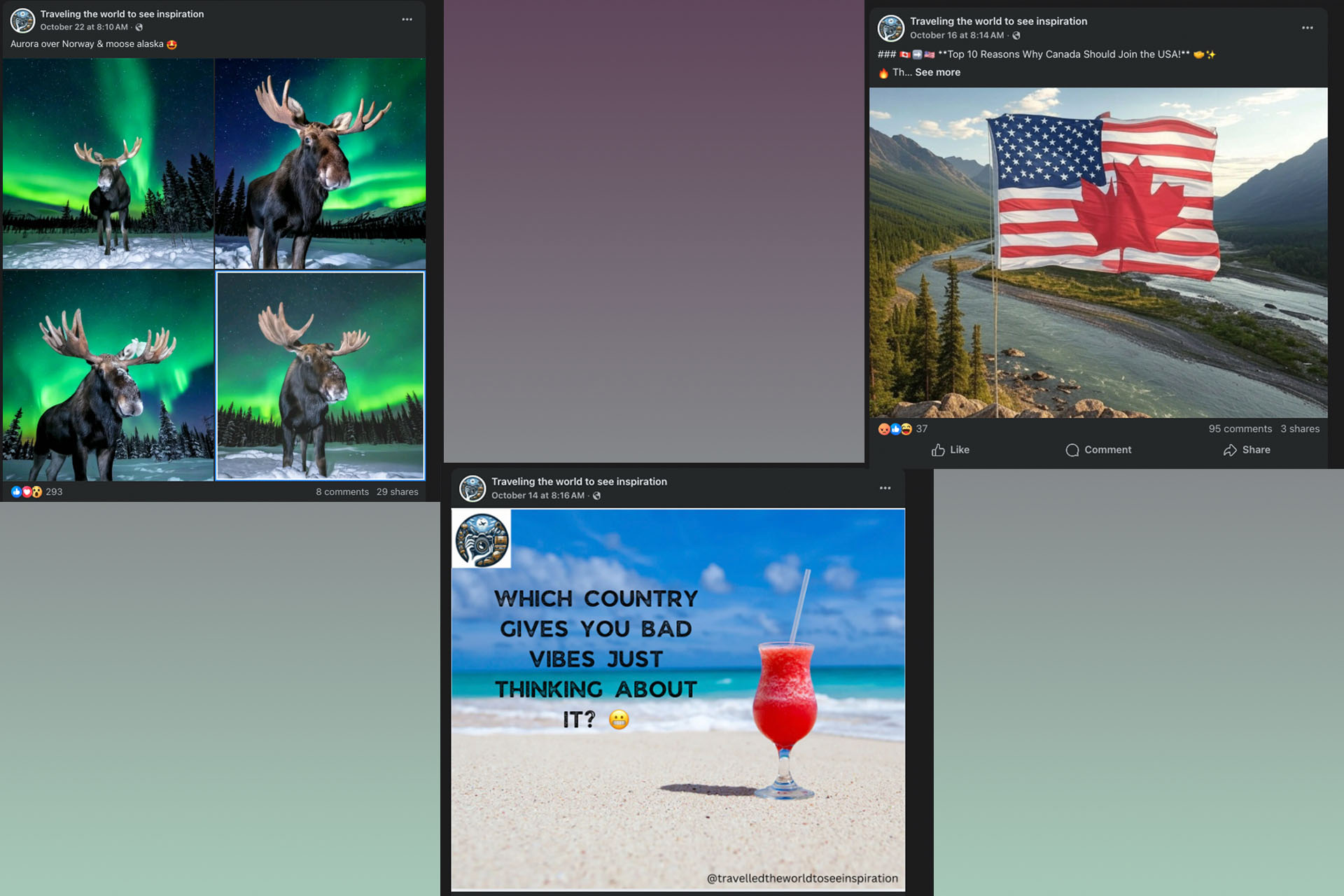
“It’s basically jumping on the trends as they’re happening,” he explains. “If you can jump on the trending topics right at the beginning, then you get the momentum, it kicks in the algorithm, and it sends your content viral. And if one post goes viral, the algorithm is going to send the next post viral, because it thinks the next post is going to get the same type of engagement.” He’s also learned little tricks for drawing more Facebook comments: adding a small error in a travel-focused listicle, or asking questions like “what’s the most boring state in America?”
Example of recent posts from one of Bouzad’s travel-themed pages on Facebook.
He estimates that at their peak, his pages collectively earned between $10,000 to $20,000 a month — primarily from performance bonuses and in-stream video ads — though they sometimes earned much more than that. Last September, 12 of his pages earned more than $68,0000 combined in performance bonuses, according to documents viewed by Engadget.
But last year, five of his meme and travel pages were suddenly demonetized. The pages received a “monetization policy violation,” a vague, catch-all term that can describe many supposed infractions. After some digging, he discovered they had been flagged for allegedly operating in a country ineligible for Meta’s monetization programs. “To monetize, you must reside in an eligible country where the product or feature is available,” a notice in the Facebook app said. “You may lose your ability to monetize if you move to an ineligible location or if Facebook changes product eligibility.” Bouzad, who lives in the United States, assumed it was a misunderstanding and would be an easy fix.
But, like so many others, he quickly found that getting help from Meta was far from straightforward. “Despite 20+ support tickets and using paid support, I receive only automated replies,” he later wrote in his first filing in small claims court last November.
Bouzad had heard of people using small claims court to get Meta’s attention and decided to try it for himself. “I thought, I’m going to go in and sue for only one page … something small, just to get in the door [and] speak to somebody.” At that point, Meta was withholding $2,498 in payments from the page called “Man Cave USA,” according to court documents. He requested Meta pay the outstanding balance, along with $409 to cover court fees and interest.
His filing succeeded in getting a response from Meta. Bouzad said that about three weeks later he received a call from a law firm representing the social media company. After an extended back and forth, Meta eventually restored the page’s ability to earn money. By February he officially dropped the case, telling the court that the company had “corrected the issue and remitted the payments owed.”
Meta’s conflicting explanations
While he was dealing with that case, he tried to resolve the issues related to his other pages. Since he was still in mediation with Meta for his “Man Cave USA” page, he asked Meta’s representatives if they could help with his other pages. He says that during a mediation session over Zoom, Meta’s legal reps told him they wouldn’t help with other pages unless they were tied to a lawsuit.
So in February he opened six new small claims court cases against the company. At the time, he said, Meta owed him more than $40,000 in unpaid invoices from accounts that had been wrongfully flagged; $15,000 of which were earnings from a single Facebook page. Because small claims court limits damages to $10,000 per case, he could only sue for a combined $35,000, but hoped that Meta would reinstate the payments if it were to re-examine his accounts.
In the meantime, Bouzad continued to try to resolve his account issues through Meta’s official support channels and received confusing, and sometimes downright conflicting, information. In one email, Meta support told him he had been flagged for “limited originality of content,” but didn’t explain. He also, again, received notifications saying that he was in a country that was “ineligible” for Meta’s monetization programs.
In two separate chats with Meta Verified, the social network’s paid subscription service for customer support, he was informed that he was ineligible because his page was linked to a bank account in Malta. The representatives then closed the chats without giving him an opportunity to respond, according to screenshots viewed by Engadget. Bouzad was getting more and more frustrated. “One, I’ve never been to Malta, two, my bank is Wells Fargo and three, I live in Oregon,” he says.
A chat with Meta Verified support in which Bouzad was told his accounts were demonetized because his bank was based in Malta. Bouzad says he’s only ever banked with Wells Fargo.
He now sees his issues as part of a wider pattern from Meta. While the company had once provided him with a partner manager — a Facebook employee who could help sort out issues and provide advice — he hasn’t had a dedicated contact at the company since 2020.
To him, the problem is twofold: Meta has become overly reliant on artificial intelligence for content moderation, which results in too many errors. At the same time, he claims Meta has largely outsourced the customer service it does offer — like through Meta Verified — and these workers aren’t able to handle the types of issues he and other creators increasingly encounter.
Some creators who Bouzad has named in his lawsuits claim to have missed out on tens of thousands of dollars in payments for what they describe as glitches in Meta’s processes. Brent, a creator who asked to be identified by his first name only, was running a successful Facebook page that posts history-themed AI-generated videos. One recent clip features a group of supposed German prisoners-of-war walking through the snow, accompanied by a caption claiming that some POWs chose to immigrate to Canada following the war after experiencing “humane treatment” from their captors.
The page was doing well for a few months until April, when Meta asked Brent to verify his identity in order to keep receiving payments. His account had more than $11,000 in unpaid earnings at the time, according to documents reviewed by Engadget.
Several months later, Brent has been unable to complete this seemingly mundane step, despite repeatedly providing Meta a copy of his ID. Brent says that the issue stems from Meta mistakenly classifying his payout account as a “private corporation” rather than a “personal account.” He says he has spent thousands of dollars on Meta Verified (the highest tier costs $500 a month) and has opened numerous support cases but has not been able to get the issue resolved.
Another creator is stuck after encountering a similar issue that prevented him from confirming the tax information associated with his payout account on Facebook. “My payout earnings were locked due to non editable ‘greyed out’ details when it came to entering tax information and other fields,” the creator explained. “After about a year of trying to get support Meta finally came back with an archaic form to transfer the payout account to a new one associated with my page.” But, after filling out the form for the transfer, Meta informed him that the more than $16,000 in unpaid earnings from his page were unable to be transferred to a new account.
The creator, who asked to remain anonymous, has spent more than a decade running music-related pages championing independent artists on the platform. “We’re collectively sick of how Meta treats everyone, failing to provide adequate support, reasoning, reports and outcomes for content creators,” he told Engadget. “There’s little to no consistency or confidence in their ability to fairly reward creators.” He’s also battling stage 4 cancer, and says the missing funds have interfered with his treatment, and added to the stress he’s already facing. His doctors recently informed him he likely has only a few months left to live; he’s still hoping to recover the missing funds.
Gaps in support
Social media is filled with numerous complaints about the ineffectiveness of Facebook’s support tools, including Meta Verified. Daniel Abas, the president and founder of the Creators Guild of America, a nonprofit organization that advocates for creators, says that demonetization is a “chronic issue” affecting creators on many platforms, including Meta’s. “What’s really difficult is not having consistency in terms of the enforcement and having policies that are opaque, having appeals processes that are inconsistent,” he said.
Abas says that creators, especially high-earning ones, should have more resources to get support from companies like Meta. “Working with a web chat to get something resolved, or submitting an email to get something resolved, and not having that human touch is a major gap, and contributes to a lot of stress and a lot of uncertainty when you’re trying to build a company.”
Meta has seemingly been changing some of the standards it has for creators on Facebook over the last year. The company in recent months began to crack down on creators sharing spammy and “low quality” content, though it only described a few specific examples of such activity, like pages that share posts with “long, distracting captions.” The company does not prohibit creators from monetizing AI-generated content. In fact, Mark Zuckerberg recently said that Meta plans to add a “huge corpus” of AI content to its systems.
Meta declined to provide a comment for this story. The company maintains Bouzad has violated its policies, and has argued his court cases involving other Facebook users should be dismissed.
Bouzad insists that he has never intentionally violated Facebook’s rules, and has grown frustrated with the company’s changing explanations for why his pages have been demonetized. In an email with Meta Verified support, a customer service rep told him a recent violation for one of his travel pages was due to “Limited Originality of Contents,” but didn’t point to a specific post. During mediation, though, Meta’s legal team claimed the same page had been generating views via “inauthentic engagement,” according to documents reviewed by Engadget. Bouzad pushed back. “This wasn’t manipulation — it was performance-based exposure … we’re being punished for the very behavior the system rewarded,” he wrote in an email to Meta’s legal team.
Bouzad says that Facebook consistently rewarded his posts with higher reach before it accused him of manipulating views.
In documents reviewed by Engadget, Meta doesn’t explain its allegation of inauthentic engagement. But the company did tell Bouzad it would be willing to pay him $5,000 — a fraction of what he claims to be owed — to settle the cases even though it was standing by its decision to demonetize his pages. Bouzad declined. He believes that Meta is unfairly targeting him and other creators who run high-earning Facebook pages.
Bouzad says he’s heard countless stories from other creators who have also been hit with vague “monetization page violations” that have stalled their payments. Much like he experienced, these account flags don’t describe the supposed infraction and don’t give an opportunity for an appeal. This, he says, leaves creators with few options outside of the legal system.
An unusual legal maneuver
After filing his second batch of small claims court cases in February, he began to reach out to his network and started filing more cases. Bouzad is not a lawyer and has no legal training; he’s relied on ChatGPT and Gemini to guide his legal strategy. Much of that strategy relies on showing that other creators have allowed him to sue on their behalf through a process known as an assignment of claims. He filed 25 such cases in 2025.
Becoming a legal assignee is at best an unusual move for small claims court. Multiple legal experts contacted by Engadget said they had never heard of anyone doing so. “Normally, I don’t think you see assigned claims in small claims [court],” Richard Slottee, a retired Oregon-based attorney, who has previously advised clients on small claims court cases. He said he was unsure of the legality of the move.
Marion County Circuit Court Judge Lindsay Partridge, who is presiding over Bouzad’s small claims court case, seems similarly perplexed by the issue. In an October 23 hearing, he said that “there are some type of claims that under Oregon law, an anti-assignment clause would not be enforceable” but that he was unsure if the statute would apply in this particular case. “I tried to do a bunch of research on this,” he said “I just can’t find an answer to it.”
Meta, on the other hand, has argued that its terms of service clearly prohibit users from transferring their rights to other parties without its consent. “Based on the No Transfer Clause, this Court should not permit Mr. Bouzad to continue recruiting Facebook users from all over the world and flooding its docket with cases where he claims standing based on an invalid assignment,” a Meta project manager wrote in a letter to the judge. During the hearing, Judge Partridge said he was “concerned” that “what I have is essentially a very technical legal issue that’s being presented by two non-attorneys.” He said he would need “a little bit more time” to make a decision on whether Bouzad could move forward as an assignee.
The group Bouzad is helping consists mainly of colleagues, friends and friends-of-friends who had heard about his small claims cases. And though a few of the individuals are people he’s partnered with in the past, he says he has no financial stake in the success of their pages. “It’s power in numbers, we felt the more people, the more noise we could make, the better the chances of getting issues resolved,” Bouzad says. “They gave me their cases to try and get that help [to] force Facebook to fix their pages.” But there’s also a potentially lucrative payday for him if he succeeds. As an assignee, he has the sole right to collect any judgment that ultimately comes out of the other creator’s claims.
This Court should not permit Mr. Bouzad to continue recruiting Facebook users from all over the world and flooding its docket with cases where he claims standing based on an invalid assignment.A Meta project manager who is representing the company in small claims courtFor some of the creators involved, the amount at stake is far higher than what Bouzad has claimed in his flings. One UK-based creator who has assigned their claim to Bouzad runs a dog-themed Facebook page that generated more than $60,000 from in-stream video ads during a one-month period last year, according to documents seen by Engadget. Like Bouzad, their page was hit with an unexplained “MPV” violation that has affected their reach. “Due to its original content and niche audience, the Facebook algorithm regularly rewards it with high reach and frequent placement in the recommendation feed,” Bouzad wrote in a small claims court filing that claimed $1,000 in damages. “This natural visibility has now been unfairly disabled by Meta.”
Another creator, who asked not to be identified out of fear of retaliation from Meta, asked him to look into three of his Facebook pages, which collectively have more than 1.5 million followers. All three had been demonetized by Meta and, like Bouzad, the creator received conflicting explanations about why.
He was told two of the pages were flagged for “limited originality” even though he told Engadget he only posts videos that are scripted and filmed by him and his business partners. His pages are dedicated to scripted sketches filmed to look like real-life encounters. They often show people in seemingly mundane situations becoming inexplicably angry, with descriptions like “Teacher Karen Demands to Know Why I’m Picking Up My Kid,” or “I Gave Candy to Kids and Apparently That’s ‘Wrong’ Now.”
The third page was hit with a “monetization page violation” for residing in an “ineligible country,” despite the fact that, according to the creator, it was managed from the United States and the EU, both of which are eligible to participate in Meta’s programs. Engadget has also verified the page manager locations using Facebook’s page transparency information.
Bouzad filed two small claims court cases related to these three pages. The two that had been flagged for limited originality eventually had their monetization restored and the case was dismissed. “I think Mel’s helping immensely,” he told Engadget. “The fact that he got us the two pages back helped us as a business a lot.”
The second case, related to the page with the “MPV” flag, is still pending. The creator, who has worked with Bouzad in the past, says he’s grateful for the legal help, but increasingly frustrated with Meta. The demonetized page was his highest-earning page, making between $3,000 – $5,000 a month from video ads on Facebook, according to documents filed as part of the small claims lawsuit. He doesn’t understand why Meta continues to penalize it when the page posts similar content as his other accounts. “We’ve always been following the rules, because this is our business, it’s how we pay the bills,” he says. But, he says that Facebook’s continued errors has made it “extremely difficult” to maintain a business as a creator.
What’s next
Of the 32 cases Bouzad has filed, eight were resolved after Meta addressed the underlying issue. Nine cases were dismissed by Bouzad as the creators chose to pursue legal action in other states. Fifteen cases, including six related to Bouzad’s own pages, are still open. In July, a judge consolidated Bouzad’s remaining cases into a single claim, despite a motion from Bouzad to keep the cases separate. “The cases affected by this order involve identical parties, raise substantially similar claims, and collectively seek damages that exceed the jurisdictional limits of the small claims court,” a judge wrote. Bouzad is currently seeking more than $115,0000 in damages, $35,000 of which are from his own pages, over unpaid invoices, filing fees and other expenses related to his months-long battle over Facebook’s monetization practices.
According to Bouzad, the actual amount owed to him and the other creators is far higher. “Actual unpaid earnings exceed $220,000,” he wrote in a filing, “but amounts have been capped in accordance with small claims jurisdictional limits.”
For now, Bouzad’s claims can’t move forward until the judge rules on whether Bouzad can proceed as an assignee. If the judge decides in his favor, he will be able to make his arguments to the circuit court judge overseeing the case. If the judge rules in Meta’s favor, he will only be able to move forward with the claims pertaining to his own Facebook pages.
Bouzad says he is prepared for the fight. He has painstakingly compiled more than 1,000 pages of court documents, screenshots and news clippings for his case. In his filing, he alleges Meta is in breach of contract over the missing payments. He says Meta has consistently flagged creators’ accounts with vague “MPV” violations, made enforcement errors, delayed payments and ignored appeals. He acknowledges that his months-long legal battle, and his reduced earnings, have taken a toll on his personal life. “Taking on Facebook, it’s not like you’re suing a mom and pop shop,” he says. “You’re suing one of the largest businesses in the world, and it has caused a lot of stress.”
His goal is still to get the monetization restrictions lifted from the Facebook pages and for Meta to resume its payments to him and the other creators. “I just want the pages fixed and the money paid that’s owed,” he said. He has hundreds of travel videos saved and ready to post on his Facebook pages if and when his monetization is restored.
Have a tip for Karissa? You can reach her by email, on X, Bluesky, Threads, or send a message to @karissabe.51 to chat confidentially on Signal.
This article originally appeared on Engadget at https://www.engadget.com/social-media/how-an-oregon-court-became-the-stage-for-a-115000-showdown-between-meta-and-facebook-creators-150000952.html?src=rss